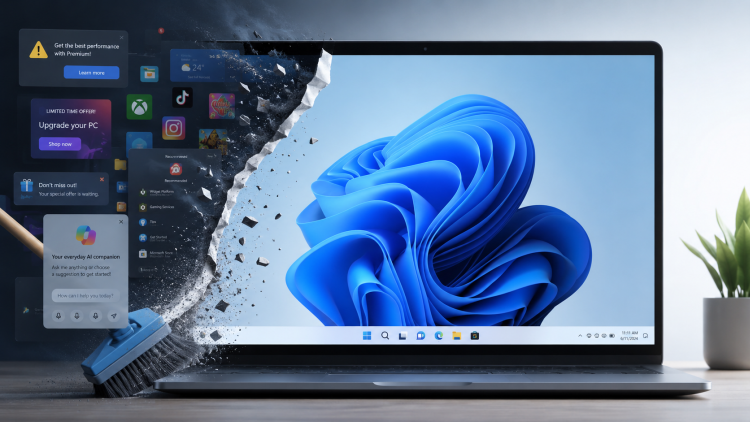
Taming Windows 11: how I stripped the adverts, bloat and Copilot

Time to spring clean your Windows 11 machine

Recently, I’ve been hearing a lot of people complaining how bad Microsoft Windows 11 is.

Maybe it’s because I’ve been lurking in a lot more Linux forums recently. Or because of the social media and YouTube channels I subscribe to. Or maybe it really is a true reflection of what people are generally thinking about Windows 11, both computer geeks and ordinary users alike.

“It’s not that bad!” I thought to myself.

Until last week when I set up a new user account on my Windows 11 laptop and within minutes thought, “What on earth is this?!”

What people complain about Windows 11

It was then that I realised that for both my Windows desktop and laptop PCs, I’ve insulated myself against most of the Windows 11 quirks that many folks have been complaining about:

  1. Bad start menu (even after the latest redesign)
  2. Adverts
  3. Copilot, Microsoft’s built-in AI, promoted everywhere
  4. Lack of a full context menu in Windows Explorer
  5. Uninstall the bloat

I’ve tweaked things enough that most of Windows 11 now feels much like Windows 10. (Even if its deeper dialogs and settings feel like a ghetto, with designs going back to Windows 95 or earlier.)

For anyone who wants to reclaim a bit of sanity, here’s what I do when I set up a new Windows 11 install.

Continue reading Taming Windows 11: how I stripped the adverts, bloat and Copilot

Helping my sleep pattern with F.lux

It’s now late October, the clocks have gone back an hour to GMT. In Scotland the nights are fair drawin’ in—it is getting dark earlier. All the more important then to make sure I look after my sleep hygiene.

For the last 14 years I have been working mostly sitting in front of a PC. I’m also a bit of a geek so I find myself sitting in front of a PC even when I’m not being paid to do so.

For years I found it hard to get to sleep at night. It turns out that staring at computer monitor for hours is not great for your sleep. The blue light emitted by a screen affects our attention, reaction times and mood (Source) and, crucially, our sleep.

In 2009, I discovered an application called F.lux that detects where you are in the world and automatically adjusts the screen colour temperature to gradually remove the blue as the sun is setting.

Continue reading Helping my sleep pattern with F.lux

Tracking my food in Trello

There is a business analyst saying that “If you don’t measure it, you can’t control it”.

With it looking ever more likely that the UK would soon lock down, on Sunday afternoon, I removed all the food from my cupboards, my fridge and freezer and have recorded it in Trello.

Continue reading Tracking my food in Trello

An overview of my planning and productivity system in 2019

Google Calendar, Microsoft OneNote and Todoist

My personal organisation system has evolved over the years in an iterative and rather agile approach.

This post outlines the major building blocks of my current system.

Continue reading An overview of my planning and productivity system in 2019

Simple categories in Feedly

Screenshot of Feedly, showing categories in left-hand sidebar

There’s something about this time of year that makes me look back on the past twelve months, reorganise things and generally try to simplify life for the year ahead. This evening I turned my attention to my RSS feed reader Feedly.

When Google closed down its Google Reader service in July 2013 I moved over to Feedly. Their migration process was flawless:

  1. Log in to Feedly using your Google account.
  2. Give Feedly permission to read your Google Reader subscriptions.
  3. Er…
  4. That’s it!

In the last five months I’ve been using Feedly on both a desktop browser and the Android app. It’s been a really useful way of keeping up with the sites I want to follow, and it also confirms recent research about how people are using the web these days: on multiple devices.

The old way

I have a problem with the way I categorise my feeds. Until this evening I’ve grouped them by topic:

  • People
  • Web
  • Web tools
  • Browsers
  • Music

The problem

The problem is: there are some feeds that I read more than others and this way of organising the feeds doesn’t allow me to find those feeds quickly.

A few feeds I try to read every post, such as A List Apart and Zenhabits. I take my time with these articles.

Some feeds I subscribe to simply to keep up with what certain people are saying, such as Steve Lawson, Robert Wright and Tom G Fischer. I try to read most posts.

Other feeds I follow to look out for important updates. These are mostly software or web development blogs such as jQuery, Google Chrome, Firefox, IE, Opera, etc. I tend to glance at the headlines and read only those posts that I think will impact me.

The new way

So, after understanding my own user behaviour, I now have simplified this to three categories:

  1. Must read
  2. Regular
  3. Occasional

I’ve also removed quite a few feeds this evening. Some feeds I realised I wasn’t reading anyway; others were a distraction.

I’m going to run with this way of organising things for the next few months to see if it helps.

Update: After a few months of trying this, I’m finding it really helpful to have my feeds organised this way. The only change I’ve made is to rename the first category from “Favourites” to “Must read”. I found that I was questioning whether “Favourites” was my own category or an auto-generated one by Feedly.

Ironically, Feedly does have an auto-generated category called “Must reads” but I’m finding this much less confusing. Your mileage may vary.